-
Chicago: 312-554-7550
-
St. Louis : 314-432-1661
-
Metro East IL : 618-346-8324
-
Central IL : 217-528-0500

Vulnerability Management for Small Business: Which Patches Come First?
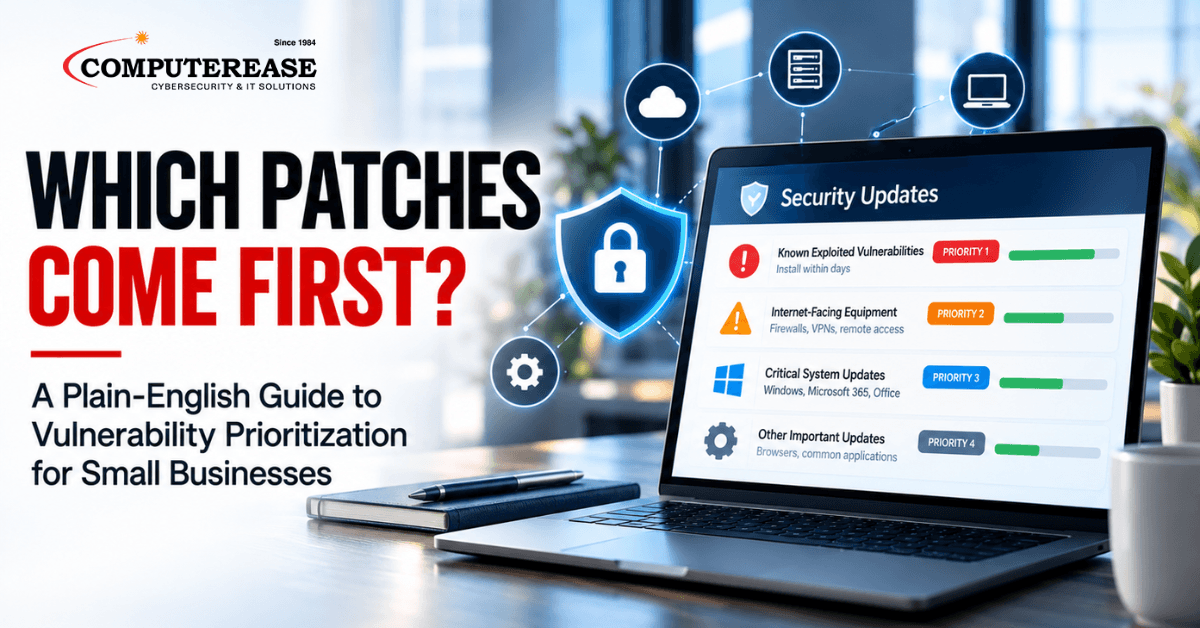
If you run a small or mid-sized business, software patches are probably not on your mind. You should not have to think about them. But one finding from this year is worth knowing. The most common way attackers got into businesses was not a phishing email or a stolen password. It was a known software flaw that had not been fixed yet.
That changes how patching should be viewed. It is no longer routine maintenance that happens quietly in the background. It is one of the main protections between your business and a ransomware attack that shuts you down for days.
This article is not a to-do list for your IT team. It is a plain-English look at vulnerability prioritization: which software weaknesses matter most, and what your IT provider should be doing about them. By the end, you will know what good looks like and which questions to ask.
The short answer to “which patches come first?” Fixes for vulnerabilities that attackers are already using come first, starting with equipment that faces the internet, such as firewalls, VPNs, and remote access tools. Next come actively exploited flaws inside your network, such as Windows and Microsoft 365 applications. Critical updates that nobody is exploiting yet follow on a regular schedule. You will not be sorting these yourself, but your IT provider should be working in this order every week.
Why Unpatched Software Is Becoming a Bigger Business Risk
Two major sources this year point in the same direction. Attackers are getting in through unpatched software more often, and businesses are closing those gaps more slowly.
The Verizon 2026 Data Breach Investigations Report (DBIR), released in May, found that 31% of breaches started with attackers exploiting a software vulnerability. For the first time in the report’s history, that passed stolen credentials as the single most common starting point. Ransomware was involved in 48% of the breaches Verizon studied
At the same time, fixes are slowing down. Among organizations in Verizon’s data, only 26% of the flaws on the government’s known exploited list were fully fixed, down from 38% the year before. The median time to fix one grew from 32 days to 43 days.
The federal government is responding by tightening its own timelines. In June 2026, the Cybersecurity and Infrastructure Security Agency (CISA) issued a directive, BOD 26-04, that gives federal agencies as little as three days to fix the most dangerous known exploited flaws. Of the 237 vulnerabilities CISA added to its known exploited list in 2026 through September 23, 112 carried that three-day deadline.
For a business owner, the takeaway is simple. The time between a flaw becoming public and attackers using it keeps getting shorter. A fix that waits for next month’s maintenance window may arrive too late.
Vulnerability Prioritization: Which Weaknesses Matter Most
Every business has hundreds of available updates across its computers, servers, network equipment, and software. They do not all carry the same risk, and trying to install everything at once is how important fixes get missed. A good IT provider works from a clear priority list, and it should look something like this:
- Exploited flaws on equipment that faces the internet: Your firewall, VPN, and remote access tools (the software that lets staff connect from outside the office) are the front door to your network. Fixes here should happen within days. Firewall and network products from vendors such as Cisco, Fortinet, Ivanti, SonicWall, and Check Point have all appeared on CISA’s known exploited list repeatedly in 2026.
- Exploited flaws inside your network: This includes Windows computers and servers, Microsoft Office, SharePoint, and web browsers. Microsoft had more additions to the known exploited list in 2026 than any other vendor, 38 through September 23, including 13 for Windows.
- Flaws linked to ransomware: CISA marks vulnerabilities known to be used in ransomware attacks. As of September 23, 2026, 361 entries carry that flag.
- Serious flaws not yet being exploited: These still matter, but they can follow a regular, tested update schedule.
- Equipment that can no longer be fixed: Devices past their end of support, such as Windows 10 computers without Extended Security Updates, will never get another security fix. They need a replacement plan.
You do not need to know the technical details behind each step. What matters is that your provider has a system like this and can explain it to you in plain terms.
Where Patching Usually Falls Short
Most patching problems have nothing to do with Windows updates. Those usually run on their own. The gaps tend to hide in equipment and software that nobody thinks about.
Firewalls and VPN devices are the biggest example. They sit in a closet and keep working, so their software can go years without a security fix. Yet they are exactly what attackers go after first. Business software is another common gap. Browsers, PDF readers, and remote access tools often update separately from Windows, and they get missed.
Then there are the devices nobody is tracking: an old server, a forgotten computer, or a personal laptop connected to the office network. Equipment past its end of support stays in use because it still works, but it will never get another security fix. And sometimes an update downloads but never finishes. A computer that has not restarted in weeks may still be running the old, vulnerable version.
A well-run program closes these gaps on purpose. Your provider should know every device on your network and watch for active threats between monthly update cycles. They should confirm that updates actually installed, and have a plan for anything that cannot be patched. You should also get a plain-English report that lets you answer your insurance carrier’s patching questions with confidence.
Questions to Ask Your IT Provider About Patching
You do not need to evaluate the technical work yourself. These questions, and what a good answer sounds like, will tell you quickly whether your business is covered:
- How fast do you fix a vulnerability that attackers are actively using?” A good answer is measured in days for internet-facing equipment, and it comes with an explanation of how they find out about new threats.
- “Do you update our firewall and network equipment, or just our computers?” A good answer is both, on a regular schedule.
- “Are our business applications covered, or only Windows?” A good answer includes common software like browsers and PDF readers.
- “How do you know the updates installed?” A good answer describes how they check installs and follow up on failures.
- “What do we have that can no longer be patched?” A good answer is a specific list and a replacement plan, not a guess.
- “Can you show me where we stand right now?” A good provider can give you a clear report without having to scramble.
If the answers are vague, or nobody can tell you when your firewall was last updated, it is worth a closer look.
How Computerease Handles Patching for Our Clients
Our clients do not track CISA alerts or decide which patch matters most. That is our job. For businesses on our managed IT services, we keep an inventory of every computer, server, network device, and application we manage, so nothing gets overlooked. We track CISA’s known exploited list and vendor security alerts, and we fast-track fixes for internet-facing equipment like firewalls and VPNs.
Our updates go beyond Windows. They cover common business applications and the software on your firewall and network equipment. We confirm each update installed and follow up on the ones that did not. Equipment that can no longer be patched goes into your replacement plan before it becomes a problem.
While fixes roll out, other protections stay in place. Managed EDR (endpoint detection and response) watches every computer for signs of an attack and can stop it in progress. Managed SIEM monitoring pulls together activity from across your network, like logins and firewall alerts, so suspicious patterns get spotted early. Penetration testing shows what an attacker could reach from the outside.
When your insurance carrier or a client asks how your business handles patching, you will have a clear answer and a report to back it up.
Security-First IT Support for Missouri and Illinois Businesses
Since 1984, Computerease has helped businesses keep their technology secure and running. Our family-owned team supports manufacturers, healthcare practices, law firms, accounting firms, and professional services companies across Missouri and Illinois, with cybersecurity built into how we manage every environment. We stand behind our work with a 100% money-back guarantee.
Not sure whether your business is exposed? Book a free discovery call. We will walk through your current setup, how patching is handled today, and which gaps to close first.
Complete This Form To Claim Your FREE Cyber Security & AI Risk Assessment
Frequently Asked Questions
You do not need to manage it, but you should understand it at a high level. Unpatched software is now the most common way breaches start. Knowing what good patching looks like helps you judge whether your IT provider is protecting your business.
Actively exploited vulnerabilities come first, starting with firewalls, VPNs, and other equipment that faces the internet. Everything else follows on a risk-based schedule set by your IT provider.
It is a free public list of software vulnerabilities that attackers are known to be exploiting. It is maintained by the U.S. Cybersecurity and Infrastructure Security Agency. As of September 23, 2026, it lists 1,721 vulnerabilities.
No law sets a deadline for most private businesses. Under CISA BOD 26-04, federal agencies get as little as three days for the riskiest known exploited flaws, which is a sensible benchmark. For internet-facing equipment, the fix should be measured in days, not weeks.
Ask for a plain-English report showing what is up to date, what is missing, and why. A good provider can tell you how quickly exploited flaws get fixed and whether firewalls and business applications are covered. They should also explain what happens with equipment that can no longer be patched.