-
Chicago: 312-554-7550
-
St. Louis : 314-432-1661
-
Metro East IL : 618-346-8324
-
Central IL : 217-528-0500

Geek Squad Renewal Scam: How to Spot a Fake Invoice
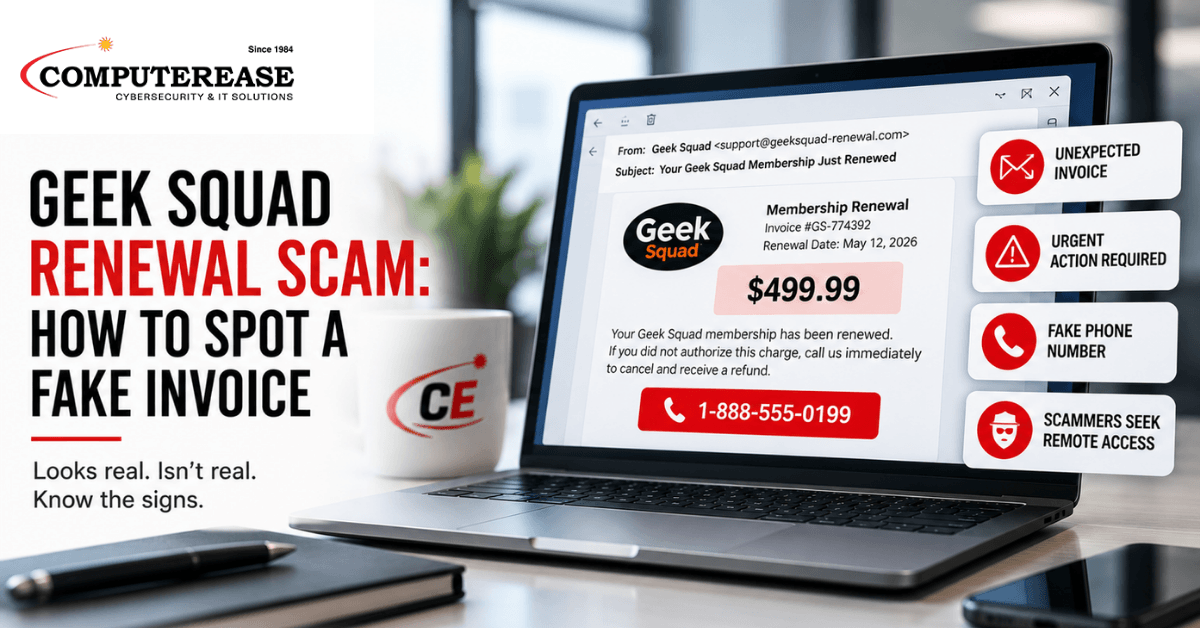
An email lands in an inbox. Subject line: your Geek Squad membership just renewed. Charge amount: $499.99. There’s a phone number to call if you didn’t authorize it.
Most people who get this email have never had a Geek Squad membership in their life.
That’s not a coincidence. It’s the entire design of the scam.
Best Buy’s Geek Squad has become one of the most commonly impersonated brands in this type of fraud. In the FTC’s 2023 data, Best Buy/Geek Squad was the most-reported impersonated company, generating roughly 52,000 reports.
And this isn’t just a problem for someone’s personal inbox. The FTC warned small businesses again in May 2026 about fake invoices that can be used as phishing scams designed to steal money, business information, or access to company systems.
Here’s how the Geek Squad renewal scam works, why it can be convincing, and what to tell your team so nobody ends up on the phone with a scammer.
How the Scam Actually Works
The email claims a Geek Squad or other tech-support subscription just auto-renewed for several hundred dollars. It may include an official-looking invoice number, renewal date, and a phone number to call quickly if you want to cancel or dispute the charge.
There’s no real subscription and no real charge. The entire message is designed to get one reaction: pick up the phone and call before the supposed charge becomes final.
That phone number is where the real attack begins.
This technique is often called callback phishing. The email doesn’t necessarily need a malicious link or traditional malware attachment. The goal is simply to convince the recipient to call a phone number, which can make the message harder to recognize using the phishing warning signs employees are most familiar with.
Once someone calls, a scammer poses as a Geek Squad or Best Buy representative and begins walking the caller through a supposed cancellation or refund.
The scammer may ask for remote access to the computer, direct the victim to enter financial information into a fake website, or create the appearance that too much money was accidentally refunded. The victim may then be pressured to “return” the extra money through a bank transfer, gift card, cryptocurrency, or another payment method.
The supposed renewal was never the real objective. It was simply the reason to get someone on the phone.
Why This Scam Can Be So Convincing
The email is built around urgency, not technical sophistication.
Seeing an unexpected charge for several hundred dollars can trigger an immediate instinct to fix the problem before stopping to verify whether the charge actually exists.
It also works on two different groups at once.
People who’ve never used Geek Squad want to dispute a charge that shouldn’t exist. People who have used Geek Squad before may wonder whether they forgot about a subscription or renewal.
Either way, the instinct is the same: call the number and sort it out.
The scam also doesn’t require someone to click an obviously suspicious link or open an unusual attachment. That’s important in a business environment because security awareness training often focuses heavily on those two warning signs.
A phone number printed on a professional-looking invoice may not trigger the same alarm bells.
Red Flags That Can Reveal the Scam
The sender doesn’t match the company it claims to represent. Check the actual sender address, not just the display name. A strange, misspelled, or unrelated domain is a major red flag, although a familiar-looking sender alone isn’t proof that a message is legitimate.
The message creates pressure to act immediately. A demand to call within hours to prevent a large charge is designed to make you react before you independently verify what’s happening.
The invoice references a subscription you don’t recognize. An unfamiliar renewal should be a reason to investigate independently, not a reason to immediately contact the number in the message.
The message wants you to use its contact information to resolve the problem. Don’t use the contact information in an unexpected invoice to verify whether that same invoice is legitimate. Go directly to the company’s official website, app, or an account you already know is real.
The invoice looks official, but there’s no order history behind it. A polished PDF, invoice number, logo, and billing details don’t prove a transaction happened. Verify the supposed purchase against the actual account or your company’s purchasing records.
What to Tell Your Team Today
Don’t call the number in the email, no matter how urgent it sounds. If there’s a real concern about a charge, verify it independently through the company’s official website, app, or a phone number you already know is legitimate.
Never give an unexpected caller remote access to a work computer. Legitimate IT support may use remote-access tools, but employees should only allow access through your company’s established IT support process or after independently verifying who they’re speaking with.
The same rule applies at work and at home. Whether an unexpected invoice arrives in a work inbox or personal inbox, verify the supposed charge independently before responding.
Report questionable invoices instead of handling them alone. An employee who’s unsure whether something is legitimate should flag it to IT or the appropriate person inside the company rather than assuming it’s fine or trying to resolve it through the contact information in the message.
If someone already called or gave access, report it immediately. Don’t stay quiet because you’re embarrassed or try to fix the computer yourself. Your IT or cybersecurity team needs to know what happened so they can determine what access was granted and what needs to be secured.
What This Means for a Business, Not Just an Individual
This scam doesn’t require an attacker to discover a sophisticated vulnerability in your network. It relies heavily on convincing a person to take an action.
Technology can still help. Email security may stop some fake invoices before they reach an employee, and endpoint security may detect malicious activity that happens afterward.
But technology alone can’t eliminate the risk. If an employee calls the scammer and voluntarily provides information or remote access, the human decision becomes part of the attack.
Remote access also creates more risk when the computer belongs to a business.
A work laptop may already have access to company email, shared files, cloud applications, customer information, or other business systems. Giving a scammer control of that computer can therefore expose much more than the employee’s personal information.
That’s why security awareness training needs to cover more than suspicious links and attachments. Employees should also understand callback phishing, fake invoices, phone-based scams, unexpected support requests, and attempts to gain remote access.
Have a Process for Verifying Unexpected Invoices
There’s another business lesson here that has nothing to do with antivirus or firewalls.
Employees should know who is authorized to approve purchases and how unexpected invoices are supposed to be verified.
The FTC specifically recommends that small businesses have clear procedures for approving invoices and purchases from vendors they actually work with.
If an employee receives an unexpected renewal notice, there should be a simple process for checking whether the company actually has that service, whether the purchase was authorized, and whether the supposed vendor relationship exists.
That process gives employees somewhere to go besides the phone number printed on the invoice.
Common Misunderstandings About This Scam
“Our spam filter would catch this.” Email security can detect and block many phishing messages, including some fake invoices. But no filtering system should be treated as a guarantee. Callback scams can be particularly convincing because the email may rely on social engineering and a phone number rather than the malicious links employees have been trained to avoid.
“Nobody here would fall for a Geek Squad invoice because we don’t use Geek Squad.” That’s part of what makes the scam effective. Someone who knows the company doesn’t have a Geek Squad subscription may be even more motivated to call immediately because they believe an unauthorized charge has occurred.
“If there’s no suspicious link, the email can’t really hurt us.” The email is only the beginning. The real damage can happen after the employee calls the scammer, provides information, installs or allows remote-access software, or follows additional instructions.
“Our employees know not to click phishing links.” That’s important, but modern social engineering doesn’t always require a link. Training should teach employees to recognize suspicious requests and independently verify them regardless of whether the attacker wants a click, a phone call, a login, or remote access.
Is Your Business Prepared for Scams Like This?
Phishing has moved well beyond suspicious links and attachments. Today’s attacks can combine email, phone calls, fake invoices, remote-access tools, and increasingly convincing social engineering.
Our Free Cybersecurity & AI Risk Assessment can help identify gaps across your current security environment and give you a clearer picture of what deserves attention first.
Complete This Form To Claim Your FREE Cyber Security & AI Risk Assessment
Frequently Asked Questions
Geek Squad does offer legitimate services and subscriptions, so an email alone isn’t enough to determine whether a charge is real. If you receive an unexpected renewal notice, don’t use the phone number or links in the message. Check your account independently or contact the company using contact information from its official website.
A scammer posing as a representative may try to get remote access to your computer, obtain financial or login information, or lead you through a fake refund process. The FTC has documented versions where scammers make it appear that they’ve refunded too much money and then pressure the victim into returning money that was never actually sent.
Stop communicating with the caller and contact your IT or cybersecurity provider immediately. If remote access was granted to a work computer, follow your IT team’s instructions rather than trying to clean up the device yourself. If financial or login information was shared, tell IT exactly what was exposed so the appropriate accounts can be secured. If money was sent or financial information was compromised, contact the bank or card issuer promptly as well.
Yes. Fake invoice and impersonation scams can reach business inboxes. The response should be the same: don’t use the contact information in the suspicious message to verify the message itself.
Check the actual sender address, verify whether your business has a relationship with the supposed vendor, and compare the invoice against your own purchasing or account records. If you still need to contact the company, find its contact information independently rather than using a phone number or link in the email.
Don’t use the contact information in an unexpected invoice to verify whether that same invoice is legitimate. Verify it independently.
Key Takeaways
- Best Buy/Geek Squad was the most-reported impersonated company in the FTC’s 2023 data, with roughly 52,000 reports.
- The FTC continues to warn small businesses about fake invoices and recommends having clear procedures for approving purchases and invoices.
- Geek Squad renewal scams often use an unexpected charge and callback number to create urgency and get the victim on the phone.
- The scam may rely on a phone number rather than a malicious link, making it different from the phishing patterns employees may be most accustomed to recognizing.
- Once contact is made, scammers may try to gain remote access, obtain financial information, or carry out a fake refund scheme.
- Businesses should train employees to verify unexpected invoices independently and know exactly where to report suspicious messages.